
The basics
Gridfinity is an open, modular storage system designed by Zack Freedman. Everything sits on a square grid: baseplates have a pocket for every grid cell, and bins have feet that drop into those pockets. Because every part shares the same grid, any bin fits anywhere, and you can rearrange a drawer in seconds.
Sizes are written as width × depth × height in units, so a 2×1×6 bin is two cells wide, one deep and six height units (42 mm) tall.
Dimensions
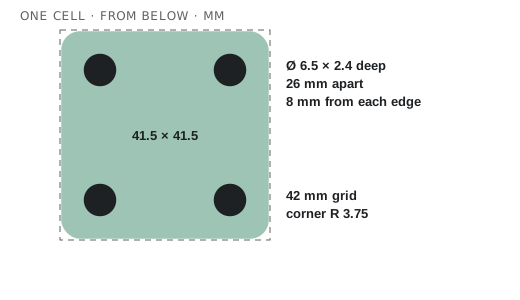
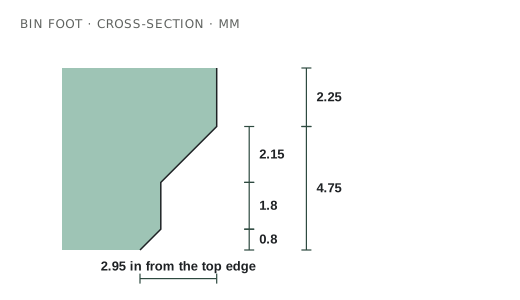
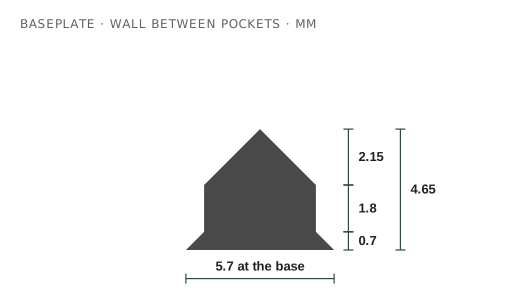
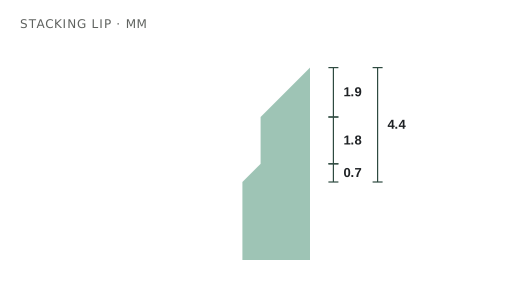
These drawings are to scale. The profiles are what make parts from different designers fit each other, so every generator on this site follows them exactly.
| Part | Measurement | Value |
|---|---|---|
| Grid | Cell size | 42 × 42 mm |
| Grid | Height unit | 7 mm |
| Bin | Outside size | units × 42 − 0.5 mm |
| Bin | Corner radius (outside) | 3.75 mm (7.5 mm diameter) |
| Bin | Foot profile height | 4.75 mm |
| Bin | Floor (standard) | 7 mm from the bottom |
| Bin | Foot bottom | 35.6 mm square, 0.8 mm corners |
| Bin | Stacking lip | 4.4 mm above the wall |
| Baseplate | Pocket depth | 4.65 mm |
| Baseplate | Outer corner radius | 4 mm (8 mm diameter) |
| Magnets | Hole | 6.5 mm × 2.4 mm deep |
| Magnets | Position | 8 mm in from each edge, 26 mm apart |
| Screws | Hole | M3, 3 mm × 6 mm deep |
| Weighted plate | 21.4 × 21.4 × 4 mm, 6.4 mm bottom |
Heights
Height is counted in 7 mm units from the bottom of the feet to the top of the wall. The stacking lip sits on top and is not counted. To fit a drawer, allow for the baseplate too.
Tallest bin for a drawer
Magnets and screws
Holes in the feet let bins hold to a baseplate. They are optional; plain bins stay put under their own weight in most drawers.
- Magnets: 6 mm × 2 mm neodymium discs, four per cell, in 6.5 mm holes 2.4 mm deep. Put magnets in both the bins and a solid baseplate, or use a steel sheet under a frame plate.
- Polarity: set every magnet the same way up in bins, and every one the other way up in plates, so any bin sticks to any cell. A marker dot on one face helps.
- Crush ribs are small ridges inside the hole that squeeze the magnet so it stays without glue. Without ribs, a drop of superglue holds them.
- Screws: M3 holes 6 mm deep let you screw bins down, or add weight with bolts.
- Only corners: magnets in just the four outer corners of a bin save magnets and still hold.
- Weights: weighted plates have a 21.4 mm pocket under each cell for a steel weight or a stack of washers, so a plate on a bench does not slide.
Baseplate types
Just the pockets. The fastest and lightest print. Bins rest on the drawer floor.
Pockets on a thin open lattice. Stiffer than a frame, still light, and it takes clips.
Pockets on a solid bottom. Needed for magnets, weights and mounting holes.
A solid plate with pockets underneath for weights. For benches and desks.
Tiles sized to your print bed, locked with printed bowtie clips. Covers drawers bigger than your printer.
Any plate padded out with a solid border so it cannot slide. The border can sit centred or against a side.
Bin types
Walls, a floor at 7 mm and a stacking lip. Add dividers, scoops and label shelves.
Hollow feet and a thin floor. About half the plastic.
Sizes like 1.5 × 2. Feet on the half cells are half size, so it still fits a normal plate.
Feet on a 21 mm grid, for half-grid baseplates.
Rows of matching pockets for batteries, bits, cards or pens.
Slots in the walls hold loose divider plates you can move later.
Slots that hold dev boards or breadboards on edge, or flat trays that stack.
A thin tube around each pocket in place of a solid block. The lightest holder.
A solid insert with a pocket shaped to each tool, traced from a photo.
No cavity. A blank to drill, carve or cut your own shapes into.
A single-wall bin printed in spiral mode. Very fast; best for light parts.
Drawer planner
Measure the inside of the drawer at the narrowest point, then pick your printer.
Print beds
How big a single piece can be on common printers. For anything bigger, split the plate and join it with clips.
Printing
- Nozzle and layers: 0.4 mm nozzle, 0.2 mm layers. A 0.6 mm nozzle with 0.3 mm layers prints big plates much faster.
- Walls: 2–3 perimeters. Bins are mostly walls, so infill barely matters; 10–15% is plenty.
- Supports: none. Every part here prints flat on the bed as downloaded.
- First layer: slow it down and keep it clean. A squashed first layer (elephant's foot) is the most common reason bins fit tightly.
- Brims: usually not needed. For tall bins on a fast printer, a small brim stops corners lifting.
- Big plates: print tiles one per plate so a failure only costs one tile.
- Magnets: press them in after printing. Holes open to the underside need no pause.
Materials
| Material | Good for | Watch out for |
|---|---|---|
| PLA | Almost everything. Easy, stiff, accurate. | Softens in hot cars and sheds (above ~55 °C). |
| PETG | Clips, workshop bins, anything that flexes. | Strings; print a little slower. Slightly less accurate. |
| ABS / ASA | Hot places, cars, garages, outdoors (ASA). | Needs an enclosure; warps on big plates. |
| PLA-CF / PETG-CF | Stiff, matte bins that hide layer lines. | Needs a hardened nozzle. |
| TPU | Soft liners and anti-slip pads. | Not for plates or bins that must hold shape. |
Fixing fit problems
Usually elephant's foot. Lower first-layer flow or turn on elephant-foot compensation (about 0.1–0.2 mm). Check the plate too.
Check the plate is flat and not warped. Magnets fix most wobble.
Check the lip printed cleanly. Stringing or blobs on the lip catch the feet.
Print clips in PETG. If they are tight, sand the edges lightly; if loose, a dab of glue fixes them.
Use crush ribs, or a drop of superglue. Check the holes are 6.5 mm, not larger.
Fill the gap with a border, add weight pockets, or put anti-slip matting underneath.
Glossary
- Unit (u)
- One grid cell (42 mm) across, or one 7 mm step in height.
- Pitch
- The grid spacing. 42 mm is standard; this site lets you change it.
- Foot / base
- The stepped block under each cell of a bin that drops into a pocket.
- The stepped hole in a baseplate that a foot sits in.
- Stacking lip
- The stepped rim on top of a bin that lets another bin sit on it.
- Scoop
- A curved inside edge that helps you slide small parts out.
- Label shelf / tab
- A ledge at the back or front of a compartment for a label. Its underside is angled so it prints without supports.
- Clip-on label
- A separate label that hooks over a wall or divider.
- Divider
- A wall splitting a bin into compartments.
- Half-grid
- Feet on a 21 mm grid for finer placement.
- Lite
- Hollow or open versions of parts that use less plastic.
- Crush ribs
- Ridges inside a magnet hole that grip the magnet.
- Skeletonised
- A plate with material cut away underneath to save plastic.
- Bowtie clip
- A small printed piece that locks two plate tiles together.
- Elephant's foot
- A first layer squashed wider than the rest; the usual cause of tight fits.
- Vase mode
- Printing a single continuous wall in a spiral.
Resources
- gridfinity.xyz: the community site with the specification.
- gridfinity-rebuilt-openscad: the open-source OpenSCAD library many generators use.
- Zack Freedman's original Gridfinity videos on YouTube, where it all started.
- Search “Gridfinity” on MakerWorld and Printables for thousands of ready-made bins.